
Weekly Meeting Attendance Report
Any user with access to that Involvement, including an OrgLeadersOnly user, can run this report. The Weekly Meeting Attendance report can be accessed from the Blue Toolbar > Cloud > Involvement Attendance > Weekly Meeting Attendance.
Enter the Start and End Date. You can also narrow the report to one or more Small Groups with the dropdown. Then click Run, and the report will download to Excel.
The report lists only the people who attended at least one meeting in the date range.
Note
The report will not include meetings in the date range where there is no attendance recorded.
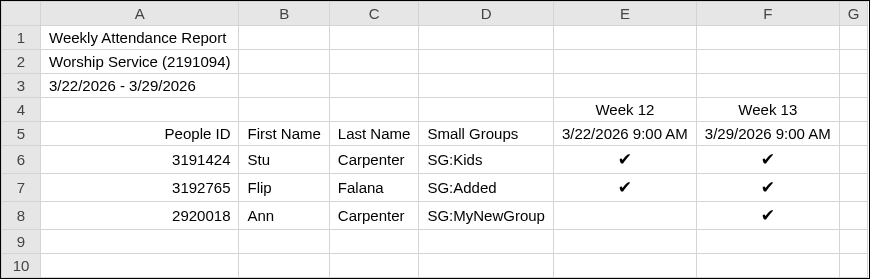
The report contains the following information:
Report Name
Involvement Name/ID
Date Range of Report
People ID
First Name
Last Name
Small Group name(s), if you selected Small Groups
Date and time of each meeting, grouped by week of the year
A checkmark in the column of the meeting date indicates attendance by the person listed.
Sample Report
Latest Update |
10/23/2026 |
Corrected the Small Groups and week details to match the report, noted that only people with attendance are listed, and replaced the sample screenshot.