
AI Content Moderation
TouchPoint checks chat content with Azure Content Safety before it reaches the conversation. Every new message, every edit to a message, and - where your church has turned it on - every photo is evaluated first. Content that fails the check is never posted: the member sees your blocked-content message instead, and staff can review the attempt in Blocked & Reported in Chat Management. See Chat for the rest of the chat feature.
The settings are found at Admin > Advanced > Settings > Integrations > Azure, in the Content Safety section, and require the Admin role. They apply church-wide, to every conversation - there is nothing to configure on an individual chat or Involvement.
The Settings
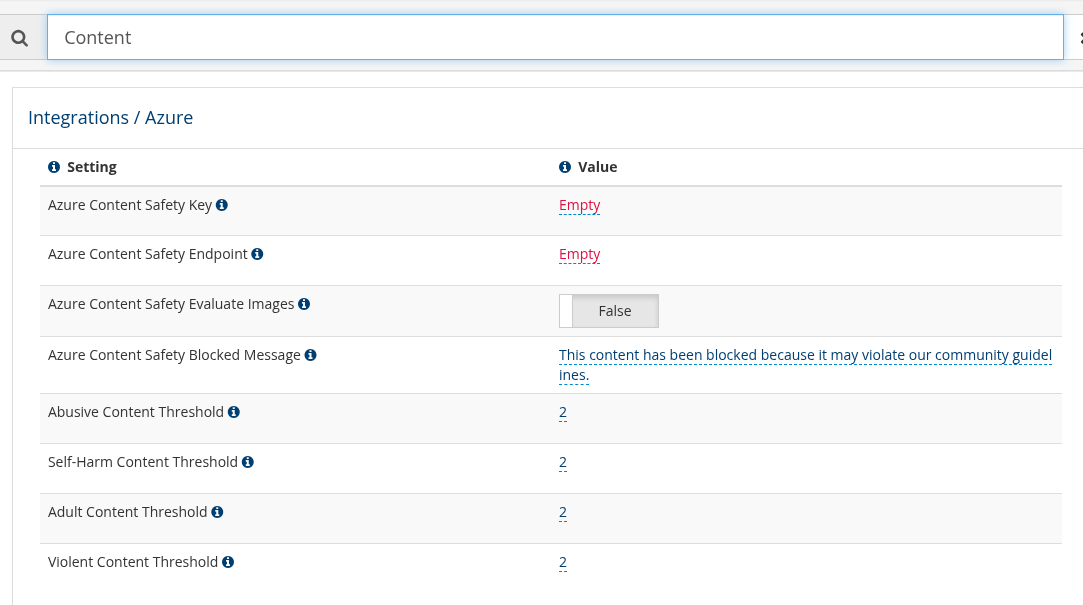
The Content Safety settings, found by typing Content in the settings search box
Setting |
Purpose |
|---|---|
Azure Content Safety Key |
Your own Azure Content Safety API key, from the Keys and Endpoint page of your Content Safety resource in the Azure Portal. Leave it empty to use TouchPoint’s managed key |
Azure Content Safety Endpoint |
The endpoint URL of your own Content Safety resource. Used only when you supply your own key; otherwise TouchPoint’s managed endpoint is used |
Azure Content Safety Evaluate Images |
Whether photos are evaluated as well as text. This applies only when you have supplied your own key and endpoint. Default: False |
Azure Content Safety Blocked Message |
The message the member sees when their content is blocked. Default: This content has been blocked because it may violate our community guidelines. |
Abusive Content Threshold |
The severity at which hateful or abusive content is blocked |
Self-Harm Content Threshold |
The severity at which self-harm content is blocked |
Adult Content Threshold |
The severity at which sexual content is blocked |
Violent Content Threshold |
The severity at which violent content is blocked |
Categories and Levels
The four categories
Content is scored separately for abusive, self-harm, adult, and violent content, and each category has its own threshold. Content is blocked when any one category reaches its threshold, so the strictest setting is the one that decides.
The severity levels
Each threshold is a number from 0 to 7. Content scoring at or above the threshold is blocked, which makes a lower number stricter:
0 blocks everything in that category.
7 blocks only the most extreme content.
Each threshold arrives set to 2, which blocks low-severity content and above.
Caution
A threshold of 0 blocks every message in that category, including ordinary
conversation, because even content scored as safe is at or above the threshold. With
Abusive Content Threshold set to 0, a message as harmless as I hate vegetables
is blocked.
Microsoft publishes the categories and what each severity level means, with examples, in its Azure AI Content Safety harm categories documentation.
Warning
The Microsoft documentation quotes examples of the content each level describes. Some of it is disturbing to read.
Reviewing What Was Blocked
Blocked messages and photos are recorded, not posted. Chat Management counts them on each conversation and lists them in Blocked & Reported, where staff can open the blocked content deliberately with View blocked content. Blocked photos are not kept - the entry shows that an image was blocked rather than the image itself.
Use Case
To be stricter about abusive language than about the other categories, leave Abusive Content Threshold at 2 and raise Self-Harm Content Threshold, Adult Content Threshold, and Violent Content Threshold to 4. Every chat in the church follows the new values: low-severity abuse is refused as it is sent while the other categories are blocked only at a higher severity. The member sees your Azure Content Safety Blocked Message, and a leader with the ManageChat role reviews the attempts in Blocked & Reported.
Latest Update |
09/15/2026 |
New article documenting the Azure Content Safety settings for Chat, the four content categories, the severity thresholds and their defaults, image evaluation, and how blocked content is reviewed in Chat Management.