
Registration Report and Export
The Registration Report is designed for camps and trips, but it is also useful for the nursery. Because it contains medical and emergency information, you can print it for a camp nurse or cabin leader, or keep a copy in the classroom. The Registration Report is a PDF with one page for each person in the Involvement.
The Registration Report (Excel) contains much of the same information in an Excel file, with one row per registrant. Standard information, such as Mother’s and Father’s names, has its own column with a header. For Registration Forms, each question has its own column with the registrant’s answer. For Join Involvements, custom questions appear in numbered Question and Answer columns.
Note
Both the Registration Report and the Registration Report (Excel) list the sub-groups each registrant is in. The Excel export has a Groups column with the sub-group names. For Join Involvements, it also has a column for each sub-group with the quantity. For Registration Forms, it has a column for each Menu item the registrant selected, with the quantity. The Groups Export also lists sub-groups, but it is for Join Involvements only.
See also
To Generate the Report or Export
You need the Access role to run these reports.
- Step 1
Go to the specific Involvement and select Blue Toolbar > Cloud > Involvement Members Reports.
- Step 2
Select Registration Report for the PDF with one page per person, or select Registration Report (Excel) for the Excel export. The report opens in a new browser tab and includes the people in the list you are viewing.
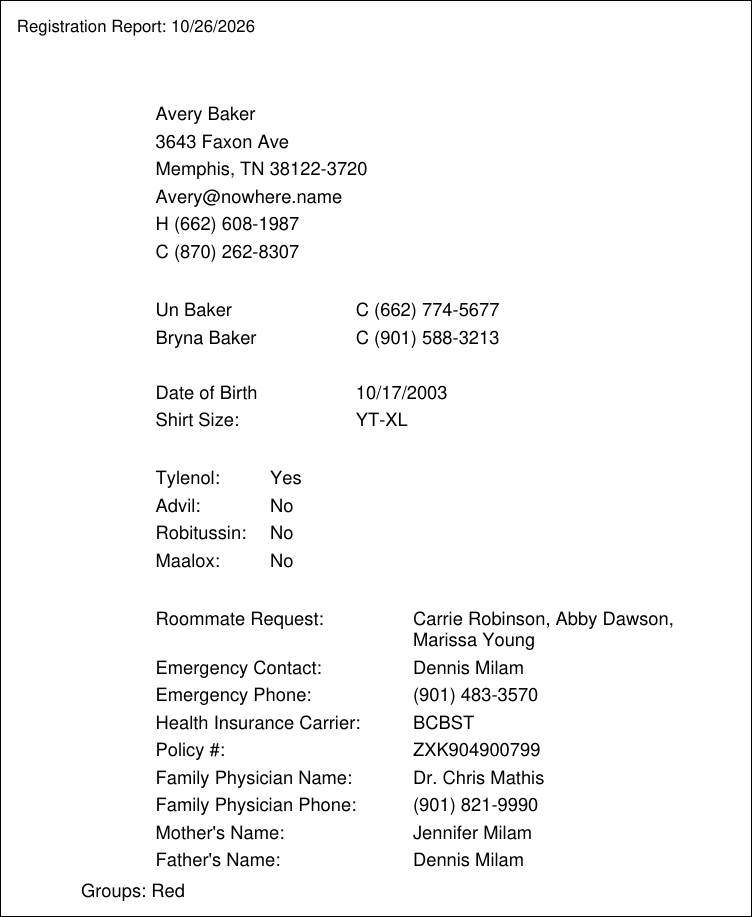
Sample Registration Report page for a Join Involvement
What Information Is Included
The following information is on both the Registration Report and the Registration Report (Excel):
- Registrant’s basic information
Name
Address
Email address
Phone numbers
Names and phone numbers of the Head of Household and Spouse in the registrant’s family
Date of birth
Comments entered on the registrant’s Involvement membership
Sub-groups
- The Registration Report (Excel) also includes
People ID
Goes By name
Gender
Grade. It comes from the grade on the people record, and does not have to be a question on the registration.
- For Registration Forms, the Registration Report (Excel) also includes
Member Status
Registration ID and Submission Date
Fee, Paid, Balance, and Discounts
The rest of the report lists the answers to the questions asked in the online registration. Instructions, Person Information, File Upload, Add to Meetings, Donation, Pledge, and Suggested Fee questions are not included.
Tip
If the registration is for a camp or trip that will be out of town, or if the event is a sport during which the registrant might be injured, the following are useful questions to ask during the registration. For Join Involvements, these display on the report and export.
Allergy information (nothing prints if no information is provided on the registration)
Specific medications that can be given (yes or no): Tylenol, Advil, Robitussin, Maalox
Emergency contact with phone number
Health insurance carrier and policy number
Physician’s name and phone number
Mother’s and Father’s names (these are requested on registrations because the parents are sometimes not in the church database)
T-shirt size
Note
If a Registration Form allows multiple submissions, the Registration Report (Excel) has one row per submission when someone registers more than once. The Registration Report has one page per person.
Latest Update |
10/23/2026 |
Reviewed the full article against current software: corrected the sub-groups note to explain the Groups and Menu item columns in the Excel export and that the Groups Export is for Join Involvements only; corrected the included information (Head of Household and Spouse instead of parents, Comments, sub-groups, Excel-only columns, Registration Form columns, and excluded question types); clarified that the medical and emergency questions apply to Join Involvements and that multiple submissions show as separate rows only in the Excel export; added the Access role, the Involvement Members Reports menu path, and a current sample screenshot.